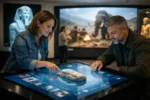
A museum visitor pauses in front of a gallery screen. They have 30 seconds before the kids pull them toward the next exhibit, a tour group arrives, or the building closes. If the experience takes too long to load, asks an unclear question, or looks like a recycled corporate slideshow, the moment is gone.
Interactive multimedia design for museums has one job: make that moment count. The right display, touchscreen, projection, audio station, or digital story does not compete with the collection. It gives visitors a reason to look closer, stay longer, and remember what they saw after they leave.
For museums, historic sites, science centers, visitor centers, and educational institutions, this is not a place for technology purchased because it is trendy. It is a production and operations decision. The content must be compelling, the equipment must work during public hours, and the story must serve people with different ages, abilities, languages, and levels of subject knowledge.
What Interactive Multimedia Design Must Do
A strong museum interactive begins with a clear visitor outcome. Should a child understand how an ecosystem works? Should a local resident recognize a familiar street in an archive photograph? Should a donor see the scale of a preservation effort? The answer determines the format, the visual treatment, and the technology behind it.
A touchscreen can let visitors compare historic maps, examine an artifact from every angle, or follow a short decision-based story. A projected installation can transform a wall into an active visual environment without putting another physical object behind glass. Video can bring an expert, eyewitness, artist, or historical figure into the room with far more emotional force than a paragraph on a panel.
But interactivity is not automatically valuable. A screen that asks visitors to tap through five menus before delivering useful information is a bad move. So is a flashy animation that buries the object everyone came to see. The best experiences are direct: they reward curiosity quickly, communicate one idea clearly, and invite visitors to continue if they want more.
Design for the room, not a desktop monitor
Museum multimedia lives in a physical space. Lighting changes throughout the day. People approach from different angles. A visitor may be standing, seated, using a mobility device, holding a child, or trying to hear over a busy school group. These conditions affect every design decision.
Text must be readable at the actual viewing distance, not just on a designer’s laptop. Touch targets need enough space for real hands, not only precise mouse clicks. Audio should be purposeful and controllable. Captions, transcripts, contrast, keyboard access where applicable, and clear navigation are not optional afterthoughts. They are part of a professional visitor experience.
A museum also needs to consider dwell time. A two-minute video may be excellent in a theater area with benches. The same video can create a traffic jam at a narrow exhibit entrance. Sometimes the smarter choice is a 20-second loop with an obvious prompt for visitors who want the longer story.
Interactive Multimedia Design for Museums Starts With Story
Technology choices come after the story plan. Before selecting a display size or building an application, define the core message, the available source material, and the visitor path through the exhibit.
Museums often have remarkable assets that are underused: archival film, oral histories, photography, field recordings, scanned letters, illustrations, collection data, and expert interviews. A production team can shape those materials into an experience that feels alive without changing the facts or oversimplifying the scholarship.
For example, an aviation collection may use video and animation to show why a particular component mattered in flight. A local history museum may combine voice recordings with animated maps so visitors can see how a neighborhood changed across generations. A natural history exhibit may use an interactive model to show the effect of habitat loss, then lead visitors back to the specimens in the case.
The point is not to add a screen beside every object. It is to identify the places where motion, sound, choice, comparison, or a deeper layer of information will make the physical exhibit more powerful.
Keep the experience short, then offer depth
Visitors should understand the first action immediately. Touch the map. Turn the digital object. Choose a decade. Press play. When someone is interested, offer a deeper layer – more images, a longer interview, a closer technical explanation, or a related collection item.
This layered approach respects both audiences. The visitor who has three minutes gets a complete experience. The researcher, enthusiast, or returning member gets a reason to keep exploring. Trying to make every visitor consume every fact is how an interactive becomes crowded, slow, and forgettable.
Production Quality Builds Institutional Credibility
Visitors may not describe bad production in technical terms, but they notice it. Weak audio, muddy video, mismatched graphics, awkward narration, and outdated interface design can make an otherwise excellent institution feel underfunded or careless. A polished multimedia installation tells the public that the museum values its collection and their time.
That means using professional video production, properly recorded voiceover, color-managed imagery, intentional motion graphics, and a visual system that fits the exhibit. It also means testing the work on the real hardware in the real environment. A bright lobby can wash out a display that looked perfect in a dark edit suite. An audio track that sounds dramatic through studio speakers may be impossible to understand next to a school group.
There is a budget trade-off here. Not every museum needs a custom application with extensive animation and original 3D modeling. A well-produced video with captions and a simple, durable interface can outperform an expensive interactive with too many features. Spend where the visitor will feel the difference: story, imagery, sound, clarity, and reliability.
Reliability Is Part of the Exhibit
A museum does not get a second chance when a screen is frozen in front of a weekend crowd. Public-facing technology needs a maintenance plan from day one, not after the opening reception.
Specify commercial-grade displays where public hours demand them. Use hardware that can be secured, ventilated, and accessed for service. Plan for automatic startup after a power interruption. Configure content so it returns to an attractive home screen after inactivity. Keep media files, login credentials, software versions, and equipment information documented for the people who will actually support the installation.
Network-connected experiences need the same discipline as any business technology. Separate public systems where appropriate, protect administrative access, apply updates on a schedule, and make sure a single failed internet connection does not turn a gallery into a row of blank screens. For some installations, local playback is the right answer. For others, a managed cloud-based content system makes updates easier. It depends on how often content changes, who will manage it, and what downtime the institution can tolerate.
Build Accessibility Into the First Draft
Accessibility is good museum practice and good business. If a visitor cannot read the screen, hear the story, operate the controls, or understand the instructions, the installation has failed that visitor.
Plan captions and transcripts while videos are being scripted. Write plain-language prompts. Provide adequate color contrast and avoid using color alone to communicate meaning. Consider hearing loops or alternate audio approaches when the setting calls for them. Place controls at usable heights and provide non-touch alternatives when practical.
Digital accessibility also matters when the exhibit connects to a website, ticketing system, online collection, or post-visit resource. The museum’s physical and digital experience should not contradict each other. A professionally designed exhibit that directs visitors to an inaccessible web page leaves the job half finished.
Choose a Partner That Can Handle the Whole Job
Museum staff should not have to coordinate a video crew, an app developer, a display vendor, a web host, and an IT repair company just to open one interactive exhibit. Fragmented responsibility creates finger-pointing when something fails.
Look for a multimedia partner that understands creative production and the technical backbone behind it. They should be able to plan the visitor experience, produce broadcast-quality video and graphics, recommend practical hardware, build the interactive components, and support the systems after installation. Ask how they handle testing, accessibility, content updates, security, warranties, and emergency service – before the project starts.
VIA Media Group brings that all-in-one mindset to museum multimedia, combining professional production capability with web, hosting, accessibility, and computer-services expertise. The goal is not to sell a pile of equipment. The goal is to put a dependable visitor experience on the floor.
Your collection already has the story. Give it the production, interaction, and technical support required to hold a visitor’s attention when it matters most.









